Impact of Google Knowledge Graph and Featured Snippets in SERPs
Written by Jeannie M. Hill | Updated 11.3.2026
Google’s latest SERP enhancements are commonly known as “SERP features”.
After conducting extensive marketing research and discovering that many bloggers, online businessmen, and marketers aren’t aware of the Google Knowledge Graph’s impact on search, this article will be an introduction and answer some questions. We will address its impact on your search engine traffic potential, its potential disadvantages, its tremendous advantages, and how to leverage them to your benefit. Leverage all the best ways to offer additional visual “clues” to help search users to find what they want Digital marketers who keep up with marketing trends are used to the continual advances in our search landscape. Google’s Knowledge Graph is no exception, and it’s evolution using deep learning prompts a continual process of staying apprised of what is happening next.
The strength of the Knowledge Graph is to offer visibility. On the heels of the statement, “we built Google for users, not websites,” featured snippets and the Google Knowledge Graph now command a commanding presence in search engine results pages (SERPs). Its Knowledge Graph hosts a useful question-answer feature.
Once Google can better understand exactly what your content is about on your website, your business will begin to see more web traffic and improved rankings. As you add the most important types of schema markup to your site, your Google Search Console Insights will be showing you the difference that they make.
Table of Contents
- Impact of Google Knowledge Graph and Featured Snippets in SERPs
- What is the Google Knowledge Graph?
- Can I Edit my Google Knowledge Graph?
- Featured Snippets Drive Massive Amounts of Web Traffic
- Can Mobile Users View Multiple Knowledge Panels?
- What are Featured Snippets?
- How can Businesses Leverage the Knowledge Graph Q&A?
- Google Business Profile Admins Can Edit Review Replies from the Knowledge Panel
- Other Ongoing Improvements with the Google Knowledge Graph
- Structured Data is Behind Many of the KG’s Visual Features
- Google Announces Rich Cards that Help Drive User Searches
- How Does the Google Knowledge Graph Card Populate?
- 52.57% of Questions Have Featured Snippets
- What is a Brand Knowledge Graph Panel?
- Provide Structured Data to Gain 7 Visual Search Features
- 4 Potential Disadvantages Posed by the Knowledge Graph to Avoid
- What are the Advantages of Knowledge Graph Optimization?
- Formatting and Publishing Markup Code for Social Profiles
- Bringing Clarity to Confusing Terminology
- Google Knowledge Graph Optimization
- A Local Google Knowledge Graph
- 5 Steps to Improve Web Traffic on Pages that Gained Featured Snippets
- SEO Preparations for the Knowledge Graph’s Future
- How does the Knowledge Graph Differ from its Knowledge Card?
- How do I Track Our GKG Changes?
- Google Knowledge Graph Optimization Services
- Measuring Value Beyond Blue-Link Clicks (Engaged Visits & Conversions)
They not only present facts and the now-omnipresent answer boxes that answer a search query directly in the SERPs but also encompass a wide range of enhancements, rich elements in the Google Knowledge Graph. Understanding and navigating the new SERPs is now core to effective SEO strategies that reach your target audience.
What is the Google Knowledge Graph?
First and foremost, it is a graph. The Google Knowledge Graph consists of the relationships between things, concepts, entities, and places. The Knowledge Graph is one of Google’s most up-to-date ways to answer search queries and deliver immediate, highly visible information to users. A Knowledge Graph is a knowledge base of intelligently connected machine-readable facts about things derived from multiple sources.
When Google introduced the Knowledge Graph (KG) on May 16, 2014, it was identified as one of the greatest intelligent search engine updates and aspects that define SEO. Accordingly, many SEO and SEM professionals find that Google “actually became smarter” with the launch of the Knowledge Graph. It has grown in prominence ever since. SEOs seeking to grasp the significance of Knowledge Graph Optimization (KGO) are finding ways to make the most of it; marked up aggregated reviews increase buyer trust.
Google’s Knowledge Graph has grown in prominence ever since its launch. A knowledge graph result is general information gleaned from all across the Internet and your site, but doesn’t offer navigational links to a specific page. Google’s RankBrain AI powers its Knowledge Graph search results, bringing context and semantics to traditional keyword-based search.
Can I Edit my Google Knowledge Graph?
Yes. Now Google makes it possible to edit it to influence and enhance your business’s visibility on the Semantic Web, with a strong focus on Google Maps results.
In our experience, most knowledge panels can be “claimed” by the business, person, or entity that they are about. The process for claiming it is called verification. This permits subjects to offer feedback directly to Google, requesting potential changes. You can also suggest your preferred photo. Local businesses have a different process of claiming their KG or panel. It is done through the Google Business Profile (GBP) platform. This permits local businesses to edit special entities in their knowledge panels, such as parking information, appointment link, opening hours, and contact phone numbers.
Google’s Answer boxes are officially named featured snippets, but are also widely known as a rich answer or a direct answer. They are the wonder elements of the Knowledge Graph. They are commanding distinction in cutting-edge SEO tactics to drive quality leads to your website and expand brand recognition. Google is testing, documenting, and revising its use, and rather than disappearing, the Google Knowledge Graph is becoming more prevalent in SERPs. It is a huge advantage to gain its globe icon with a link to your website.
When it comes to Google’s KG, Google frequently does not cite its sources — which has drawn some criticism. It is interesting to note that since then, the search giant has introduced the Fact Check tag with links to the source.
Featured Snippets Drive Massive Amounts of Web Traffic
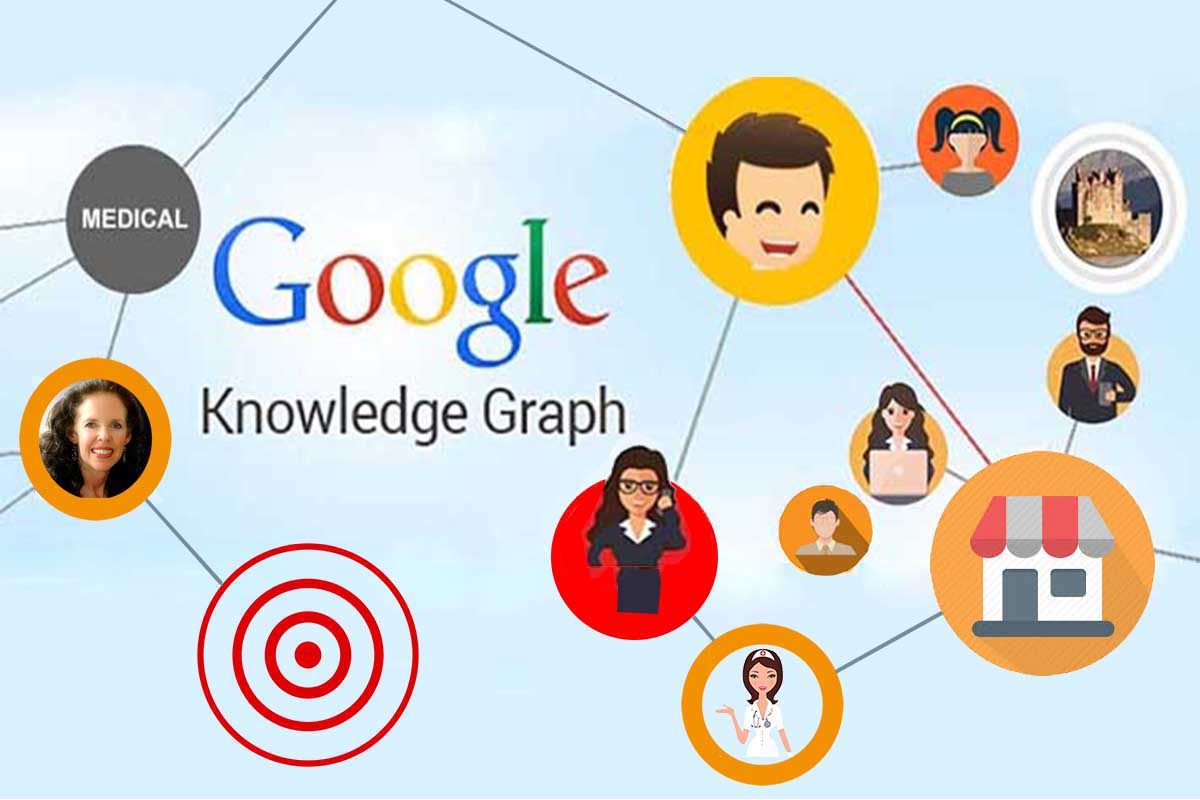
The rapid growth of Artificial Intelligence in search means that Google is giving preference to featured snippets, especially for breaking news (sports, famous people, and happenings). The Data Knowledge Panel takes up the entire screen on mobile devices, which can help businesses engage smartphone users.
So marketers ready for the fast track can use schema implementation to make it easier for searchers to find your related content and have a chance to win featured snippets. The algorithm is temperamental due to updates, but this is advanced search and well worth it.
“Even if you are struggling with classic SEO, you still need to keep them in mind throughout the whole optimization process (include your site’s data science architecture). To illustrate the process of conquering the SERP features, we will show you how to hunt down one of the most desirable ones: the Featured Snippet.” – SEMrush [1]
Can Mobile Users View Multiple Knowledge Panels?
Yes. Your marketing approach needs to be agile to maximize visibility in Knowledge Graphs.
Consumer preferences have evolved from being largely conducted on desktops to being conducted on mobile devices. Given the higher mobile search activity levels, optimize your content for smaller screen sizes that doesn’t permit side-by-side knowledge graph displays. This content strategy also supports advertising to the mobile-first world.
That is why Google’s Knowledge Graph is often not contained within a single knowledge panel on mobile. Rather, multiple knowledge panels may display interspersed among the overall results. When business growth means presenting new digital markets, this gives you more rich visual space in Google SERPs.
What are Featured Snippets?
Here is a visual example of this very page to help you see what your business can look like if you have rich featured snippets. If you have noticed how some e-commerce sites display fancy yellow stars, prices, or thumbnails in their search result listings, it’s because they have structured data in place.
Structured data may sound a bit geeky, but it’s a manner of tagging the data in your web pages that Google, Bing, Yahoo, and Yandex search engines have agreed to utilize. These featured snippet data elements may range from pricing and availability to breadcrumbs and video.
It is helpful to first identify the differences between knowledge graph results and featured snippet results. While both forms of search results are features at the top of the page – before paid and organic placements – they are not one and the same. Rich snippets are search results that fit what the naming convention implies: unique snippets of content from an individual web page.
Google states that it “programmatically determines that a page contains a likely answer to the user’s question, and displays the result as a featured snippet.”
How can Businesses Leverage the Knowledge Graph QandA?
Begin by determining what a simple, straightforward question is in your market space. Then, craft an equally simple and straightforward answer to that question. The content that you’re preparing needs to be a full answer to the question and address related issues with that particular question and answer occurring somewhere on that page in a very focused spot.
Structure your content with solutions that people need in the format of an itemized list or a paragraph condensing your answer. Ensure that both individuals and GoogleBot can quickly spot it on the page. Try to get this web page ranking in earned search within the top 10 responses for that query. Your domain needs a strong, trusted authority factor and should have a reasonably high-quality website that is eligible for featured snippets and the Knowledge Graph. Google strives to offer its users quality sites that have earned trust over time before giving it such prominence in search results.
Google Business Profile Admins Can Edit Review Replies from the Knowledge Panel
Google Business Profile (GBP) makes it possible for individuals with an admin role to edit their past responses to reviews directly within the Knowledge Panel.
Businesses will value you, as many negative responses are cleared up, the consumer better understands the situation, and continues happily with the same business. This saves business owners both time and hassle when negative reviews are left too hastily in a disgruntled moment or by someone falsely portraying themselves as a form of black hat SEO.
Google rolled out the update quietly in the second week of September 2018. No official announcement preceded it, but it was found in our Google Business Profile dashboard.
Other Ongoing Improvement with the Google Knowledge Graph
New features are continually added..
When the Hummingbird algorithm was announced, noticeable changes were perceived in the Knowledge Graph display. There is continuous evolution in search results themselves, as Google continues to expand Google Now Cards, the response box, and the Knowledge Graph, while adding more featured snippets. Increased amounts of relevant information now appear visually next to or above the search results in addition to the core search criteria.
Or another example, Movie Goers can Like or Dislike a movie in Manchester by the Sea in Google Knowledge Graph.
Searchmetrics [2] wrote about how “immediately after the Hummingbird release, all SERPs keyword categories returned more Knowledge Graph overlays than before (i.e. more keywords had KG integration), with the exception of keyword searches as questions. As Hummingbird proliferated, however, the number of KG integrations increased in all categories, including keyword searches as questions that also increased.”
The ways we see the Knowledge Graph displaying today have vastly increased; included in the numerous versions or results are: reviews, weather, recipes, menus, Olympic medallists, founder information, video, stock availability, calculator, etc. Since not every searcher is specific, Google still faces challenges deciphering the exact intention behind such individual search queries, which may result in seeming disconnects in Knowledge Graphs.
Google algorithm updates that you may be most familiar with include Panda, Penguin, Pigeon, Hummingbird, The Mobile Search Algorithm, and RankBrain. If these updates affect your site’s visibility, remember they aren’t intended to hinder it. Know that it is meant to help Google achieve its objective: to build a better knowledge databank that individuals can access easily through Google Search wherever the user may be and whatever device they choose to use.
Undoubtedly, you recognize that Google is foremost an advertising company, with its bread and butter coming in from Google Ads PPC. However, Google has always been more than that – and is increasingly so, as the Knowledge Graph typifies.
Structured Data is Behind many of the KG’s Visual Features
The extra touches of structured data markup can produce that “finesse” of added information that you see in SERPs right next to a website listing and its Meta description. The pure size and dominance of the Knowledge Graph on the right-hand side are hard to miss. For example, if you are searching for a restaurant, as I did for Good Earth, not only is the restaurant’s name displayed, but also the main image, address, hours of operation, pricing, and stars indicating positive patron reviews.
Can any person quickly learn how to gain a KG search advantage?
Yes and no. Learning the correct and best applications of structured data markup takes time. The opportunities to gain its full benefits continually evolve, meaning you need someone who has the dedication and sufficient time to manage structured data and Semantic SEO for you. The business sites that gain a competitive edge are successfully navigating a myriad of SEO and marketing tasks, including leveraging visual search. The role of each contributing individual, whether owner or employee, is best spent growing your business in the role they do best.
Trying to figure out how to implement structured data on your website in squeezed moments may leave you with errors that hinder rather than improve your chances in search. Neil Patel says that “schema markup is the quickest and most effective way to help the Knowledge Graph return your results in graph boxes”. [3] Plan from the start to hire an expert who has carved out sufficient time to manage this process of obtaining featured snippets for you.
Google Announces Rich Cards that help Drive User Searches
Google announced a few features in the Google Search Console that can assist matching user intent to your business services and corresponding products. It is called “Rich Cards”. Preparing web content for inclusion in Google Search using structured data can enhance your business’s visibility across an expanding range of visual formats.
Google’s core intent is to give individuals a correct answer to their questions or the best product match. That’s no small task and requires much more than just presenting choices that closely match a keyword phrase. It takes the ability to make broader connections between data and user intent.
How Does the Google Knowledge Graph Card Populate?
Google’s dedicated focus on users’ search intent and use of semantics is behind how Google Search chooses to display information. Google algorithms continue to do a better job of deciphering what the user really wants within each query and within a specific context. Conversely, a well-optimized graph can help your business stand out and gain a competitive edge.
For example, if a person queries for “cars,” the search intent is unclear, so search engine result pages (SERPs) will try to present a suitable mix of listings, including a Knowledge Panel about cars. Mine includes a Wikipedia definition of a car, a link to cars.com, and information about the 2006 film “Cars”.
Now, what if what I really wanted was to rent a car for my summer vacation, or to be stranded on the side of the road and need help towing my car? Not everyone who uses search offers search engines their clear search intent to narrow the information provided to better match what they need. So Google comes up with various providers with a range of “best-guess” matches.
However, if your business is to offer cars for rent or a tow service, it is best to mark up your content with structured data to make it eligible for single or multi-item rich cards for related searches.
This is a great opportunity to help the search giant know more about your business and the information on your website, so it can do its job and send you the right visitors. Expect to see the use of Google semantic search grow and stay up on the latest ways to be found online.
52.57% of Questions have Featured Snippets
Not only that, 94% of web pages with a featured snippet rank in the top five URLs in search engine result pages, according to SEMrush.com. Questions, prepositions, and search query comparisons account for most featured snippet results. A giant-sized 52.57% of questions have answers that earn featured snippets. If you remove questions, prepositions, and comparison keywords, the number of featured snippets drops. The remaining 82% of keywords then comprise 5.90% of featured snippet results. This reflects the migration to Google’s Answer Engine.
What is a Brand Knowledge Graph Panel?
The Brand Knowledge Graph panel is largely used for navigational and branded queries. A branded Knowledge Graph panel can have a huge impact: it captures the attention of the person performing the search and serves as an explicit token of the business’s online authority and trustworthiness. Google Discover is an AI-driven content topic suggestion tool included with the Google Search app. To show up here, start by creating an entity in the Google Knowledge Graph.
According to the May 10, 2016, Google Search Result Types: A Visual Guide article by Masha Maksimava, “The current version of the panel consists of the name of the company, a logo, a link to the company site (a nice recent addition), a description, and a list of the entity’s social profiles.” [7]
Provide Structured Data As Much As Possible to Gain the Following 7 Visual Search Features
7 Core ways to stand out in Google Search
1. Direct Answers
2. Local Map Packs (leverage Local Business schema markup)
3. Breadcrumbs
4. Google Reviews
5. Video Thumbnails
6. News Results
7. Rich Cards
Here are examples of what structured data looks like in search engine listings:
1. Direct Answers: a Hot Search Trend
Direct answers are meant to offer an immediate response to an Internet user’s search query.
Google’s machine learning algorithm strives to show the exact answer when matching a search query – right at the top of the search page. As individuals favor the use of mobile devices, the requirements and frequency of mobile search, as well as Accelerated Mobile Pages (AMP), have brought direct answer featured snippets to the forefront.
Internet surfers want immediacy. Listening to what they want leads to more e-Commerce online sales. Google’s direct answers aim to provide the best possible user experience by answering search questions as quickly as possible. And they are accomplishing it. Google was forthcoming about this goal and the value to users in a 2014 annual report it filed at the U.S. Securities and Exchange Commission [4]:
“We used to show just ten blue links in our (search) results. You had to click through to different websites to get your answers, which took time. Now we are increasingly able to provide direct answers — even if you’re speaking your question using Voice Search — which makes it quicker, easier and more natural to find what you’re looking for.” – Google
Rich answers or direct answers are visible in SERPs when Google can present data and facts from a trusted source. E-Commerce sites must be visible for product-related search queries. Google more often returns a voice search with a direct answer rather than links in the SERPs. The reason is that since the majority of voice searches currently come from mobile device users, and these individuals want immediate answers on their tiny screens, according to Eric Enge of Stone Temple, who told attendees at the March SMX conference.
If your website can be the answer to a direct answer, then your digital life is good! In Quarter 1 of 2016, we found that links to the source were provided with the Direct Answer approximately 75% of the time. Currently, most searches do not quickly churn out a direct answer. However, where possible and with the correct schema markup, these results offer what busy searchers need. Approximately 19% of search queries were responded to with direct answers. They are powerful and concise summary answers for simple questions. Often local search sessions are multi-step and therefore miss this feature.
2. Local Google Map Packs
In 2015, Google restructured its search results and gave higher priority to local results, or its “map pack”. The map pack now displays above all other organic results – which offers high visibility for local Minneapolis businesses, or whatever city you live in, that face strong competition in SERP rankings.
Your Google Business Profile (GBP) account connects individuals to your business and integrates with a variety of Google products. For many local businesses, the most important single product is Google Maps – this is where the Map Pack rankings originate and where you can tweak and correct them. Additionally, your Google Business Profile account is the bridge between your business and its associated Google Maps listing and generates a Knowledge Graph result in search results. Don’t divide or dilute your NAP information with confusing formats. Each location needs a unique, verified listing under a single owner’s business account.
3. Breadcrumb Featured Snippets
Google supports JSON-LD across markup-powered features, including Knowledge Graph entities, sitelinks search boxes, BreadcrumbList, Event, FAQPage, Article, and Recipe rich results; Google recommends using JSON-LD as the preferred structured data format alongside microdata or RDFa.
4. Google Business Reviews
You will need to provide review structured data to fit with Google’s approach to organizing business reviews from critics and patrons. Web designers who simply add sentences or paragraphs from each review provider will find it insufficient. Google states: “Human-readable reviews are not sufficient; instead, the website must include structured data about each review.” Online reviews establish credibility and work as a form of digital validation from a human who voluntarily posts their personal experience after using a business service or product.
Machine learning then uses Artificial Intelligence to display these user experiences in the corresponding business’s KG. It is one of the most common KG results, which makes the process of obtaining reviews even more important. The professional craft of requesting business reviews merits development, as they impact search relevance and are prominent in Knowledge Graph results.
It is also possible to gain additional business information next to your reviews in Google search. When you use structured markup with schema.org property names, the benefits extend beyond Google. The same code, if defined as a schema.org/Review item, is supported by all major search engines.
5. Gain Video Thumbnails right in Google’s Knowledge Graph
Web surfers love to consume video content because it is often considered easier than taking the time to focus that reading requires. You can mark up your video content with item-specific structured data, which in turn provides users with video thumbnails and video titles right in the KG.
By providing details such as your video’s description, thumbnail URL, upload date, and length, users are quicker to opt to view your content. Additionally, Google may even generate your rich snippet markup to power popular mobile content carousels.
6. News Results
Featured snippets and AI Overviews are no longer separate optimization goals. Pages selected for featured snippets are cited in AI Overviews at roughly 2x the rate of non-snippet pages.
Google integrates Knowledge Graph entities and AI structured model outputs directly into its news and informational SERPs. It can then display breaking stories with entity context.
The Knowledge Graph – in all versions – has tons of room for expansion and is slated to become an even more influential part of how search engines work. We can expect the range of objects it can capture, including new results, to increase. Consumers are quickly becoming more familiar with using Knowledge Graph panels to get what they are looking for and seem to prefer it. Probably because search engines are getting better at understanding search intent.
4 Potential Disadvantages Poised by the Knowledge Graph to Avoid
Just by looking at the image of the above Knowledge Graph, it is easy to quickly assess a few potential disadvantages.
1. What if someone searching for your site can obtain the information they need directly from the knowledge graph, such as whether your business is open or closed at the moment? He or she won’t need to click your website link to obtain that information, as they used to.
2. Also, the Knowledge Graph doesn’t offer call-to-action buttons, so you cannot convert that user into a buyer from there.
3. Next, note what is going on in the bottom of the knowledge graph panel – optional sites show up there and are listed under “people also search for.” That is a little hard to swallow if a user is redirected to your competition straight from your own knowledge graph.
4. Lastly, if the official website appears lower in the earned SERPs than your competition, the user is less likely to click it from that list. It is important to gather as much information as you can from heat maps for the web page in question. With the Knowledge Graph being so super-sized, we’ve determined so far that it is of greater benefit than not. It can be an ideal place to answer your audiences’ questions.
If you’re worried after reading the above list, a great refocus is: create content for humans and not for search engines.
What are the Advantages of Knowledge Graph Optimization?
1. Offers highly visible basic business information
2. Builds trust with potential site visitors
3. Assures users of a relevant experience
4. Builds your network of social media followers
5. Displays quality of service and products
6. Makes it easy to contact you
7. Makes it easy to add new reviews
8. It’s free
Featured snippets in Google knowledge graphs can help your business get found fast when the race is on for whose shop gets found first.
1. Offers highly visible basic business information
Create web content that answers typical user questions. After all, that is the main job of search engines – answering search queries. Whether someone wants to know how to build a pergola or find the best heart surgeon in your city, more and more we are using search engines when wanting an answer. Know what questions your prospective clients are asking. Determine your next topic, who your target audience is, who they hang with online, and how to connect their searches with the right solutions and answers. On the right is an example of the Google Knowledge Box.
2. Builds trust with potential site visitors
Build future content that is desirable from the user’s point of view versus yours. Google’s Knowledge Graph is a highly visible assistant in helping people who are actually searching for a business like yours. So if your site can populate the Knowledge Graph while your competitors are still working out their chances of doing so, your business is likely to gain the click in a sea of plain links available on the Internet.
Be aware that your personal KG can also show related searches in the form of “people also search for”. Meaning, you really want to command your space and that your entity relationships matter.
3. Assures users of a relevant experience
Even before they click to visit your site for the first time, the KG gives a glimpse of who you are and if your business looks like what they are searching for. Offer better on-site structure and user experiences. Semantic search is making SEO more about the context and the user’s intent. Tweak your website and leverage this to your advantage. Do your homework well and incorporate LSI keywords to help you broaden your search results and better target your audience.
Once you know precisely who your audience is and what they need and how to offer solutions, structure your site UX and content accordingly. Make it easy to find related content that you already offer. Knowing which keywords users use to find pages like yours can help you balance your web page structure and determine new content topics. Still, the knowledge graph pushes this feature, making it a requisite.
4. Builds your network of social media followers
The KG creates an opportunity to add to your network of social media followers. Customers need appropriate business communications at each stage of the client acquisition journey. They may have multiple questions that need to be answered before feeling confident enough about their purchase. Social media platforms are hugely popular forums for relationship-building and a way to direct individuals to your web pages that offer the solutions and products they are already seeking or need. Your personal and business Google Knowledge Graph can win clicks from this huge chunk of Google SERP space.
5. Displays quality of service and products
It can immediately lend credibility to your business by displaying both the number of reviews and reviewer ratings. Seeing a high number of stars by your business name is a positive reflection on you.
6. Makes it easy to contact you
It offers multiple ways to contact you. It may be that little nudge to help someone call, check out your website, book a reservation, or get directions to your business location. Connecting is made simple and fast with just a one-click effort that produces higher mobile conversions.
7. Makes it easy to add new reviews
It is now even easier to leave business reviews. All users have to do to start the process on your Google Business Profile is click on “Write a review”.
8. It’s free
Is Google Knowledge Graph free?
Yes, to a point. The Google Knowledge Graph Search API lets web developers and SEOs enjoy a free quota of up to 100,000 read calls per project per day. Very few have a need beyond this.
Formatting and Publishing Markup Code for Social Profiles
Often when a prospective buyer wants to know more about a particular business before making a purchase, they seek to learn more from social media. To assist these individuals, GoogleBot can scour the Internet for this information and populate links to social accounts directly in the KG. Currently, you can specify your preferred social profiles by highlighting them with well-structured data directly on your official website.
At this time, the following social media platforms are most often added to the KG, with Google hinting that more will be included in the future:
• YouTube
• Tumblr
• Myspace
• SoundCloud
Google algorithms sort through the social profiles you specify and then present the ones it determines to be most relevant in response to users’ queries. For websites that have a verification process, Google typically limits what populates to verified profiles. Hidden content is frowned on; markup should use social profiles that correspond to those that users can actually see on the same web page.
Bringing Clarity to Confusing Terminology
KNOWLEDGE GRAPH
The Knowledge Graph is the term attached to the program where Google is accruing its immense database of information. It consists largely of public domain information. Google is leaning on data called “entities”, and the connections between them. Google’s primary intent is to determine a page’s relevance to what the user is seeking. It relies on authoritative sources such as Wikipedia, Wikidata, the CIA World Factbook, and historical Freebase records to collect data on individuals, animals, events, history, statistics, and topics.
Stone Temple offers the following example; they know that the Empire State Building is a building, and that it has attributes, such as when it was built, an address, nearby restaurants, and much more.
The Knowledge Graph is the database; it is not the visual results we see displayed in SERPs.
KNOWLEDGE PANEL
Various forms of search queries produce intelligent information from the Knowledge Graph database, which may be displayed on the right sidebar of the SERPs. This space was formerly dedicated to paid ad search results, which have now moved to the top above the main body of earned search results.
Danny Sullivan originated the term “Knowledge Panel” to identify it, while I couldn’t find formal documentation of how Google initially labeled this display format. The substantial amount of real estate given to machine learning may indicate how important it is to the future of Google Search. [3]
KNOWLEDGE BOX
Shifts in how and where this displays indicate the level of testing that Google is conducting to come up with the best search results for users. At times, data from the Knowledge Graph is displayed in the area above earned search results rather than in the right-hand sidebar. This outlined simple box is often referred to as the “Knowledge Box”.
This can come in many forms, but typically explains the definition of something or provides information in response to a searcher’s query. Andrew Shotland talks about this “grid of data…. I really don’t want Google controlling what parts of my site get shown in the SERPs, particularly when it looks more like a Lack of Knowledge Box.” (https://searchengineland.com/dont-trust-google-structure-local-data-246585)
Google Knowledge Graph Optimization
Below are some of the ways we boost your company’s digital presence by helping you take more control of what populates in your KG.
* Add schema markup to your web pages
* Optimize your company on Google Maps
* Display your social media profiles within your knowledge box entry
* Keyword research for new web pages that drive data population in the KG
NOTE: Google welcomes public feedback as that helps to grow the use of the Knowledge Graph box. By submitting a response when a KG pop-up offers the opportunity, Google incorporates feedback labeled “not useful”, “useful”, and “awesome” to add value to users and make improvements to its search capacity.
NOTE: Google talks about “carefully vetted content for knowledge panels for health issues”. It has automated systems that gather facts for the Knowledge Graph and is especially concerned with people’s well-being. This means that thorough research for healthcare marketing and content creation should be conducted well in advance to provide trusted and useful information.
A Local Google Knowledge Graph
A local Knowledge Graph is a bit different in that it is more often displayed for branded queries when Google assesses that the searcher’s intent is to find a business’ office/physical location. This often comes from a mobile device search rather than from someone seeking general information about the business. This listing format is visually similar to its branded sibling in search results, but it pulls the data it relies on from a different source.
A local KG typically displays an image, a map with a pin, a link to quickly access the business’s site, a direct link to directions on Google Maps, Google reviews and rankings, contact information (excluding email), possibly a few Google review excerpts, and events or a Popular Times graph for a few select niches. Google’s Knowledge Graph is a dynamic and highly visible platform that describes and links information about many entities, including the ones that appear in dataset search: organizations providing datasets, locations for spatial coverage of the data, funding agencies, and more that is continually expanding.
As Google continues to test and tweak its Knowledge Graph results, recognizable brands are finding that both the branded and the local Knowledge Graph may be served up in search queries. Its data repository is used by Gemini to match queries for better personalized results.
5 Steps to Improve Web Traffic on Pages that Gained Featured Snippets
Improve your website’s odds of being featured in Google’s quick answer box by following our on-page improvement tips:
- Create web content in concise answer format using a bulleted or numbered list.
- Incorporate optimized video content, with transcription, that answers common user questions.
- Make your page stand out with additional high-value information like PDFs, charts, and infographics.
- Once your revised web content has been uploaded, tested, and given final tweaks, check your Knowledge Graph and related ontology.
- Add unique text to explain the value of your new content and share it across your Google Business Profile updates and social channels.
NOTE: If your web page offers more value in terms of solutions and information than just the direct answer to the question users are seeking, you will likely see them advance to additional pages, follow you on social media, or even share your page. Search engines need to see proven domain trust over time – so if you don’t see your featured snippet status improving right away, keep doing all the right things and be patient. After just three to five days, several web pages we optimized in this manner received featured snippets.
REMEMBER: The value in getting a featured snippet is that it brings the right visitor to a relevant page on your site that is key to your business success.
“Checking your company via the API or looking for a Google Knowledge Panel Help card helps confirm whether Google recognizes your brand as a structured real-world entity or merely unlinked text. They are meant to help you get a quick snapshot of information on a topic based on Google’s understanding of available content on the web.” – Google Knowledge Panel Help
“This (the Knowledge Graph) is quite an impressive demonstration of what a semantic search engine with structured data can bring to the everyday user.” – Razvan Gavrilas, Founder & Chief Architect at Cognitive SEO
“For performance marketers, this needs to be paid attention to. Not only is Knowledge Graph an important tool that needs to be understood and utilized, but the AI power it needs to be communicated with to ensure that it receives accurate information.” – Oliver Wood [5]
SEO Preparations for the Knowledge Graph’s Future
Currently, Google’s answer boxes rank at the top of SERPs.
Today, if you are serious about your business getting found online, you must speak to more than your target audience. You also need to prepare your digital content for the programs that filter and interpret web pages for users. Assisting top search engines in recognizing the meaning and context on your website is now an essential part of achieving favorable search results. Start with an Audit of your Website’s schema markup.
The Knowledge Graph is projected to grow substantially and become an even more dominant part of how search works. Expect the array of objects it can capture information about to surge, the information amassed to multiply, and for consumers to become savvier with handling Knowledge Graph panels to obtain what they are looking for. Gain help to edit and ensure that your Knowledge Graph results have accurate and useful information for your business brand.
How does the Knowledge Graph Differ from its Knowledge Card?
Without clarity on the difference it’s easy to confuse the Knowledge Graph and the right-hand side panel display on your screen. The Knowledge Graph is the engine that populates the panel, technically called the Knowledge Graph Card. Displayed on the card are the more visible results produced by the graph. When a topic has sufficient data, the card will include a variety of information, such as relevant facts, images, reviews, a Wikipedia description, social profile links, related queries, and ratings.
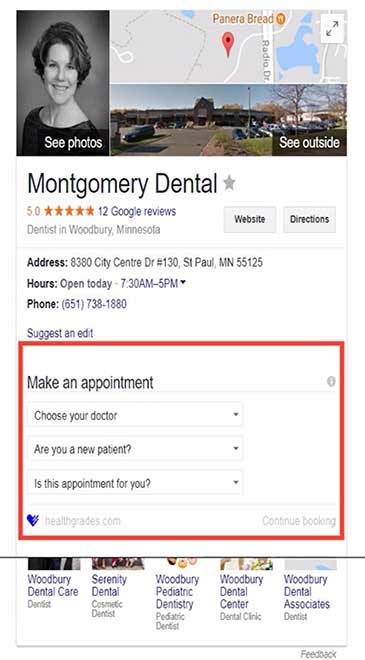
Recently, more details on local business orders and appointments have been noticed in the Knowledge panels in the United States. I noticed a client who had 2 separate knowledge panels, one for their personal site and one for their Google Business Profile listing; others have reported it when their business has more than one location. Some show reviews in the middle of the Google knowledge panel, others show products available, and still others have an appointment booking app that appears in the center of their knowledge panel.
While adding structured data for orders and appointments may not improve page rankings, it will likely engage more customers for the business. More importantly, you want to have robust and valid local business schema.
How do I Track Our GKG Changes?
Google’s Knowledge Graph Search API is a read-only database. Meaning, Google does not provide an official “change log” or push notifications for shifts in the global graph. To track modifications to your Google Knowledge Graph (GKG) entities—such as shifts in confidence scores, description changes, or disappearing entity IDs (mids)—you must build a proactive polling system.
Knowledge Graph Search API Method entities search documentation: Site owners and SEO specialists can track the following items and how they change over time within the Knowledge Graph API results: [6]
• Score changes (resultScore)
• Classification type (@type)
• Description
• Detailed description (goog:detailedDescription)
In the example provided, the “resultScore”: 896.576599
To monitor Knowledge Graph changes, it is possible to use the Google Knowledge Graph API and a tool like VisualPing. By generating an HTTP request to your Google KG API and incorporating VisualPing, you can track changes in these results. While there are many excellent types of website audits that you can benefit from, auditing and perfecting your structured data implementation is vital to gain more featured snippets. The incredible increased percentage of answer SERPs means that you definitely want to optimize for a chance to gain visibility in Google Quick Answer Boxes.
Below is the table Google provides for Query Parameters:
| Parameter name | Type | Description |
|---|---|---|
query |
string |
A literal string to search for in the Knowledge Graph. |
ids |
string |
A list of entity IDs to search for in the Knowledge Graph. To specify multiple IDs in the HTTP request, repeat the parameter in the URL as in …?ids=A&ids=B |
languages |
string |
The list of language codes (defined in ISO 639) to run the query with, for instance en. |
types |
string |
Restricts returned entities to those of the specified types. For example, you can specify Person (as defined in https://schema.org/Person)to restrict the results to entities representing people. If multiple types are specified, returned entities will contain one or more of these types. |
indent |
boolean |
Enables indenting of JSON results. |
prefix |
boolean |
Enables prefix (initial substring) match against names and aliases of entities. For example, a prefix Jung will match entities and aliases suchas Jung, Jungle, and Jung-ho Kang.
|
limit |
number |
Limits the number of entities to be returned. |
Zero-click searches hit 68%, according to Cris Tolomia on October 8, 2026. He talks about how AI Overviews are accelerating that shift for publishers and brands.
- Comscore measured AI Overviews on 39.4% of U.S. desktop queries in June 2026, up more than 13 percentage points in a year.
- 68% is up from 49% in 2019.
- 24% of respondents reported avoiding the featured snippet because they thought it was an ad.
- Google displayed an AI Overview in response to 39.4% of U.S. desktop searches in June 2026, up from 25.8% a year earlier.
Google Search switched up a web page listing that gains eligibility for the featured snippet position by no longer repeating it in the search results. “This declutters the results & helps users locate relevant information more easily. Featured snippets count as one of the ten web page listings we show”, stated Danny Sullivan. Even with the switches, if you earn a critical featured snippet, you typically gain vital visibility.
Google Knowledge Graph Optimization Services
SEO changes and ground-breaking releases for Google users continually open up new opportunities for businesses. Google Knowledge Graph visibility is changing the search engine game and affecting Search Engine Optimization. We help Minneapolis businesses know how to stay current and maintain the best in SERP visibility.
Call and ask for Jeannie Hill at 651-206-2410.
All of your business local web pages should be optimized with semantic keywords relevant to service locations. By investing in your site’s SEO and SEM efforts on a weekly basis and monitoring new features, beta platforms, and what you need to do to respond as soon as they are released, you can start outmaneuvering your competitors in your vertical. In brief, the foundational SEO on your web pages should be stellar.
While semantic structured data markup helps search engines better understand the context of your website, the end benefit for individuals searching for a business like yours is that they can find you. Correct implementation yields visual featured snippets in search results that are very attractive and increase click-through rates to your website. Google is giving businesses – like you – the opportunity to refine your data with schema.org markup. This offers you the best chance to avoid Google displaying your info incorrectly. The Search Giant wants to ensure that the content it serves in answer boxes is as close as possible to what your business is really about and provides the strongest match for the query.
Measuring Value Beyond Blue-Link Clicks (Engaged Visits & Conversions)
Do you need help implementing Structured Data Markup Services for your Google Knowledge Graph and Featured Snippets?
When 68% of searches end without a click, businesses risk losing direct human connection unless they pivot from chasing rankings to building trust. Your structured entity authority can power AI synthesis: “In an answer-engine world, stop writing to be clicked and start structuring truth to be cited.”
With strategic help, your business can benefit from the superorganic placement that the Google Knowledge Graph and featured snippets offer. We can guide you or personally implement content or code adjustments to earn these outstanding search results. Because we stay current in search marketing strategies, we can improvise the right Schema.org markup for your business website.
By engaging a further ontology called Productontology, a coder can specify products and business services, but it can also be used to help extend other schemas to get more specialized results. The process can be summarized as locating a matching entity in Wikipedia and then creating a URI using Productontology.
To enlist help to write the structured data markup that powers these features, call 651-206-2410 and request a free consultation with Jeannie Hill, owner of Hill Web Creations.
Sources & References:
[1] https://www.semrush.com/blog/featured-snippets/
[2] https://www.searchmetrics.com/knowledge-base/hummingbird/
[3] https://neilpatel.com/2015/06/30/the-beginners-guide-to-the-googles-knowledge-graph/
[4] https://www.sec.gov/Archives/edgar/data/1288776/000128877615000008/goog2014123110-k.htm
[5] https://www.searchenginewatch.com/2016/03/17/what-performance-marketers-need-to-know-about-google-knowledge-graph/
[6] https://developers.google.com/knowledge-graph/reference/rest/v1/
[7] https://www.link-assistant.com/news/serp-guide.html#knowledge-graph-results