
What is Google Now and How it Became Google Discover
By Jeannie M. Hill | Updated 10.20.2026
Google Discover (replacing Google Now) is a personalized, AI-driven content feed inside Google Search that shows you articles, videos, and updates based on your interests without requiring a search query.
Its latest updates transform it into the perfect smartphone companion and an ideal way to reach digital shoppers. Google Discover is one of the more ambitious evolutions of Google’s search software. The idea is simple — predict what you’ll want or need to know before you know you need or want it, and serve it up in an easy-to-read format.
Google Discover is now one of the most powerful — and most unpredictable — channels of web traffic for any content publisher.
According to Wikipedia, “Google Now is an intelligent personal assistant developed by Google. Google Now is available within the Google Search mobile application for Android and iOS, as well as the Google Chrome web browser on personal computers. Google Now uses a natural language user interface to answer questions, make recommendations, and perform actions by delegating requests to a set of web services. Along with answering user-initiated queries, Google cards proactively delivers to users more information that it predicts (based on their search habits) they may want.”
It is a voice-activated digital assistant which takes on the many years of investment in artificial intelligence to a higher level of understanding Internet users’ search queries. It advances Google’s voice search and natural language deciphering capabilities to a higher tier, while empowering users to complete everyday tasks like researching a product, booking show tickets or a dinner restaurant reservation.
QUESTION: What are Google Now Cards?
ANSWER: Google Now cards intuitively offer a lot of information at a glance. Android users who have a Nexus or Google Play edition device can swipe a finger up from the bottom of any screen on that mobile device. With the Google Now Launcher installed, swipe left when on your phone’s Home screen. Google Now Cards updated to being the Google feed experience, and has since been updated to being Google Discover.
It integrated with the Google Assistant to support Google’s role as an answer engine.
What’s the difference between Google Now, the Google Assistant, and Google Discover?
When Google Now was initially rolled out, it provided users with search results. The more advanced Google Assistant seeks to make those search results more accessible and often in a question answer format. They all are forms of advancing voice-activated Google Search technology. The goal seems to be offering people who use Google Search better information in a more conversational, personalized, and more accessible format. The technology giant behind Google Discover seeks to be your friendly semantic search go-to for answers and solutions.
How US Users Customize Discover in 2026?
- Tap the Follow button on topics of interest.
- Click the 3-dot icon on a card to select “Not interested.”
- Manage your Interests and Web & App Activity in your Google Account.
What are Recent Updates to Google Discover?
Google is updating both its Assistant and Discover in preparation for the Pixel Tablet. The change in Google Discover is already rolling out to existing tablets, such as the Samsung’s Tab S8 with Google app 14.2.7.26 (current beta). Its user interface display is updating from two columns of articles to three, meaning that your feed now goes edge-to-edge.
Viewers currently see the Google logo and their profile avatar moved to the top corners. The navigation rail in the Google app is cleaned up without the empty space. Another functional update is Google now places all articles in cards with faint outlines; at the same time, cover images get smaller.
New in Google Discover in 2023
- Our SERP analysis revealed that Discover uses your H1 and other header titles in search engine result displays.
- Google’s November 2023 core update affected some websites’ ranking in Discover, regardless of rankings in organic search. Specific competitive business niches, such as scholarships, internships, and fellowships, are now prioritized differently in Discover.
- Expanded product cards that show searchers’ pricing details along with the latest deals and discounts. The emergence of this addon to product carousels in SERPs, a new deals interface has surfaced in Google Shopping Results.
- A new SERP option is to “Get the latest on…”; it displays below an article to learn more about the author. You can embed author details in article schema markup. Clicking on the link leads you to a fresh SERP for the entity with a knowledge panel, and can include service-based businesses.
History of Google Now and Google Discover
Google Now was first announced at the annual I/O event in 2012. As with every effective business plan, it intends to meet a real need and do so better than anyone else does. At its introduction Google said it will give Internet users search results before searching for them and will quickly match the search intent. Google Discover’s origins go started at this time when it was called “Google Now.” The purpose of “Google Now” was to provide searchers with information throughout the day without personal input. Meaning, Google would do the Google Searches for you.
In August 2016, this statement has become more of a reality. Having already gained much about every user, it is stunning how accurate Google Now is at offering up search options; for the on-the-go user, it definitely saves time. This update may be a paced rollout. Conversational AI is much about immediacy and relevancy.
As a leader in voice assistants, the search giant is taking recognition for its new Google features and rich cards. It can accurately acknowledge and interpret what a searcher asks it (within reason, of course); and simple web searches are just the beginning. With so many simultaneous advances in earned and paid search, its voice features aren’t well recognized yet. This article hopes to shed light on the topic. As with many valuable mobile search options, it takes time to become an expert on Google Now Android assistant.
As of this August, your Google Now feed may be displaying a new card, it’s called “Explore Interests”. One simple tap on it opens up a menu, which allows users to manually add choice sports, movies, famous individuals, or stocks they follow to their interest feed.
Google is Expanding from a Search Engine to a “Live” Cloud Search Engine
Google In Apps beta for the Google’s Android search app, version 6.5, renames some of its primary features. If you check your Settings, Now Cards have been renamed to Feed, and Now on Tap is named “Screen search”.
If you find clarifying the various Google products and developments from each other confusing, you are not alone. In simple English, Google is seeking to be your first choice when seeking information through a search, from any device and in every format available including visible knowledge graphs. “It makes sense that Now is turning into the Google feed and the Google screen search, just as the upcoming Google voice assistant will be called the Google assistant,” explains The Verge in its September 11, 2016 article, The Google Now name appears to be going away. At the same time, your opportunities to build-out your Google Business Listing are expanding.
What are Some Google Discover Category Interest Options?
• Art and Design
• Auto and Vehicles
• Beauty
• Dating
• Events
• Food and Drink
• House and Home
• Parenting
The new categories will be available to iOS users and Android device owners on Google Play within 60 days. A comprehensive list of category examples is provided. Searchers can immerse themselves in popular categories such as dining, travel, entertainment, sports, and more. Whether searching for something specific, browsing, or learning how to ask better questions for precise answers, Google offers more ways to explore.
We’ve also learned that web traffic from Discover and AI-Generated answers is unpredictable and less dependable than keyword-driven search queries. However, it can still supplement traditional keyword-driven search traffic.
If you’re not pleased with your cards in mobile search results, you can always inform Google Now of your interests. For example, you can tell Google Now that you prefer your weather cards displayed in degrees in Celsius versus Fahrenheit, or to stop displaying cards within another subject category. Go ahead and null an entire category of cards that you don’t use, for example, cards about recent news stories that you feel read up on.
From what we can see, Google may intend to use its own algorithms to determine an individual’s niche interests by analyzing prior searches, which sites you have visited, and your app downloads. It seems like it will use future Google Assistant conversations. You can add popular news to the Google Now feed manually.
This trains Google as to a searcher’s preferences and can be used by Deep Learning to meet user intent.
What are Google activity cards?
Google announced new activity cards in 2019 that were designed to help people pick up where they left off in their search. Activity cards display at the top of search results for logged-in users when repeating a search on the same a topic. Businesses can also build out FAQ content on your website and service pages. Using your Google Business Profile Q&A is also an effective way to show up immediately to mobile users asking common questions that you can answer.
UHow Google Gemini Extensions now connect with Gmail, Google Calendar, and Google Maps
Google Gemini connects with Gmail, Google Calendar, and Google Maps through Connected Apps (formerly called Extensions), allowing you to search, summarize, and automate across your personal data and live external information. I use Gemini Enterprise and find it extremely useful.
How this connection works:
- Setup & Toggle: You enable or manage these integrations by going to gemini.google.com, clicking Settings and help (or Customize), and opening Connected Apps. A single Google Workspace or account connection links Gmail, Calendar, and Drive together.
- The @ Command: You can summon a specific app directly inside your prompt by typing the @ symbol (e.g., @Gmail find my flight itinerary or @Calendar).
- Privacy & Security: Google states that personal Workspace data accessed by Gemini is private and is not used to train public AI models. You can turn off or revoke access at any time in your settings.
What we glean so far is that it will read through updates in your Gmail or on your Google calendar to add useful morsels of information to display. Ask location-based questions like “Find restaurants near my bus station open after 10pm” or “How long is the drive from Minneapolis to Rochester right now?”. Watch who surfaces in the Google Maps local pack.
5 Steps to Select Google Now Category Options for an App or Game
Indicating a new interest category for an app or game can be done in five easy steps:
1. Sign in to the Google Play Developer Console.
2. Indicate the app of your choice.
3. Click Store Listing from the left menu.
4. Find “Categorization,” and select an application type and category.
5. Next, return to the top and click Save draft (for new apps) or Submit update (for present apps).
For a complete list of all voice commands visit Greenbot.com.
10 Top Reasons Why Users Love Google Now
Google Now was created for the on-the-go individual who seeks convenience as much as anything else when shopping or researching before making a decision. Google has taken immense strides to ensure that convenience, which is limited previously by the need to use buttons or navigate to a specific screen, takes advanced form.
1. Google Now works from any screen, even the lock screen. All you have to do is navigate to the primary Google Now page, tap the mobile menu icon in the top left corner, select ‘Settings’, then ‘Voice’ and then end with ‘OK Google detection’. Switch all the toggles to “on” and enjoy the ability to launch Google Now by saying “OK Google” on any screen, regardless if it is the lock screen or if the screen is set to off while charging. The typical swipes and taps are eliminated.
2. Google Now notes for later recall what you last asked it to do. That means that if you later ask an additional follow-up question, it already recognizes what you are talking about. For example, if you previously asked it ‘How far is it to the Mall of America?’ , then you can follow that up with ‘how far is it back to my hotel?’ or ‘what is the best place to park there?’ and Google will know you’re still talking about the Bloomington MOA, saving you time, effort, and make it more noticeable that you are requesting an answer from a robot. Landing pages with schema enhancements perform stronger.
3. Hand-free Use. Most Google Now settings are quite easily accessible with a simple toggle method. Using just a voiced command it is easy to request that Google do it for you. Try asking it to turn Wi-Fi or your phone’s Bluetooth, open Google Maps or to switch on your flashlight. Too tired to set an alarm? Just ask Google Now to do it as you fall asleep. It can decipher commands beyond the usual speech recognition of words like “set an alarm for…”, and knows what is meant by “wake us up at…”, or a timer such as “bake for 45 minutes” for example.
This works for accessing your documents and then dictating draft notes that you can use at a later time. No need to lose your great ideas for your next web page just because your hands aren’t free. You can also say “Open Instagram” and so it happens!
4. Google Now is great for setting personal reminders. Its flexibility goes beyond what many similar platforms offer location-based familiarity with time-based options, but with Google Now, they can be location-based instead. It is meant for such things as quick reminders such as pay my phone bill when I get home, or to send a thank you note when reaching the office. And you will get a nice reminder when you reach the indicated location. You can also ask it for information about what is in your calendar for a certain day or occasion; this can reduce the embarrassment of forgotten appointments or tasks.
Healthcare sites that want to show up in Top Stories and Google Discovery should carefully consider how to improve their content for E-A-T.
5. You can select the voice of your choice. While you could choose the Spanish or French language, if you speak English, you still have multiple Google Now voice search options to select from. There’s the UK English one, an Ireland’s English, New Zealand English, and the US plus an everywhere else one. Most individuals select the language most native to their location, but you can change it by navigating to the Google Now settings screen, selecting ‘Voice’, then ‘Languages’ and opting for English (UK) if you wish for a fun British English voice.
6. Easy use for language translation. The ability to use a translate card in Google Now on Tap has been around for some time. Chrome on Android has been used widely already for its translation functionality. A decided difference between Google Now on Tap and Chrome is that Android device users can use Now on Tap to translate words within an app, a new ability for Android lovers.
7. Google Now on Tap now offers a Discovery feature. Android users are able to simply tap the new “Discover” button to see a stream of alternate content that is relevant to content already displayed on their screen. For example, tapping the Discover button on an article about the presidential election, we were presented a wide range of content, from news articles about Trump and Hillary Clinton to video collections centered on this hot topic.
8. Use of Search by Image for scanning barcodes / QR codes. Google introduced this as an easy way to scan the barcode of any item for purchase at a storefront. It allows prospective buyers to quickly find and read previous user reviews for the item, which often confirms a pensive buyer to make a purchase decision.
9. Google Now lets you customize how you utilize it. If your daily route frequently includes traffic issues, use these cards for information to pop up when needed. You can select your interest and follow what matters most to you. Go to your Google Now screen, tap the menu and choose the ‘Customise’ option. Now you can select which if any apps can display cards, the geolocations you are seeking alerts for, current news for your favorite sport or Olympic teams, ominous weather alerts, and much more. Enjoy your favorite tunes. Just say “skip” when the next song in the lineup isn’t your favorite.
Up till now, the only way to control suggestions was by eradicating them. If Google presumes incorrectly whether one would like to see a specific website’s news on their Now feed, we can customize it by selecting a “Not interested in X” option and eliminate obtaining similar updates ever again. Google Now has become significantly more customizable.
Under your Accounts and privacy settings, you can indicate nicknames, select web history, and decide how the Voice settings should function, including the “Ok Google” signal word detection. Additionally, an option is provided to dictate what Phone search covers. In Google Now cards, it is possible to check your card history, delete your setting preferences, select if you want Google notification alerts, and indicate what topics you want to be notified for. If you select Now on Tap and toggle it to “on”, you can hold down the Home button on any screen and Google will search it and hopefully return beneficial related information.
10. Prompt a text message, tweet, email, or phone call. With a quick voice command, you can send text messages and initiate phone calls without picking up your phone – as long as it is nearby. By stating “text *name* and then your *message* the task is taken care of for you. You will be asked to confirm before the action is taken. For moments when speed is critical, it accomplishes what you previously could only do by hand. Likewise, this works for sending emails and even tweets by saying “post to Twitter *tweet*”.
Example Instant Messaging Communications
- Show me my recent text messages. (Then follow voice prompts)
- Phone [Tom] (also works with relationships: Call [husband])
- Call [Heather] using my speakerphone
- Text [Reuben] [loved the package that arrived yesterday]
- Send an email to [Sally Hutchinson], subject, [marketing plan], message, [I think we are ready to move forward.]
- Post to [Twitter]: [I just arrived safely in Washington DC!]
- What is the proper way to say [I hope you’re not late]?
- [Send a note to self] to [Next Google+ post].
Adhere to Google Guidelines for Google Now Search Results
The end user is showing a preference for smartphones with larger screens for easier navigation and use. Flagship smartphones from leading technology manufacturers have been offering bigger and more powerful screen options in recent years. To get more individuals to use Google Now, the ability to get more done on a mobile device is paramount. Samsung has taken the lead in making large-screen smartphones, followed quickly by Apple. Apple’s first smartphones with screens over 5-inches debuted with the iPhone 6 back in 2014.
Android smartphones permit more customization of smartphone home screens than the iOS version with resizable widgets that display real-time information. This prominent feature on Android devices has tipped purchasing decisions for a bracket of choosy buyers. When prospective buyers have more flexibility, they tend to respond favorably.
How Google Determines When and Which Now Cards are Displayed
When deciding which cards to offer, Google Now utilizes information from your Android device and from your use of additional Google products. Google Now leverages its store of big data from your personal Google Account. Adding local business schema helps to gain more visibility in rich results. This largely determines by the settings you turn on or off. These may include Internet and app activity, device information, and location history. Google says that “Some Now cards are shown based on your home location. If your home location isn’t available, Google Now may use your work location or your device’s current location.”
You may already be alerted to the fact that when logged in, Google scans your Gmail, looking for confirmation communications and other insights that might trigger helpful Google alerts and reminders. This is also used to display “relevant” ads next to your Gmail messages, which is a nice benefit for businesses marketing via Google paid services.
Types of Google Cards
What types of Google Cards can people select?
New types of Google cards are emerging, adding to those we have become familiar with. Some in particular can really boost your brand. Each of them contains specific and unique information that will match a related searcher’s intent. Currently, cards for everything don’t exist, but here is a list.
Popular types of content cards shown in a Google Knowledge Graph Card:
- A Person
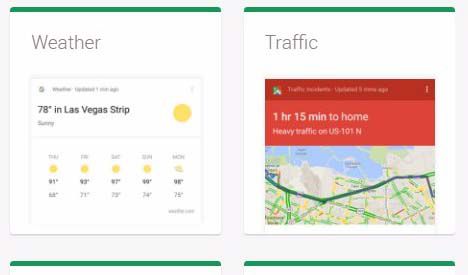
- Weather reports
- Sport team scores
- Recent Tweets
- Movies and show times
- Recipes
- Images
- Business entities
- Business store locations
While our list is already fairly extensive, the opportunities available are greater. Because these cards are so visual and quickly served up, they grab the eye over “traditional blue link” listings. If your brand can get listed in any of these cards, you’ll drive very targeted traffic back to your site. ECommerce sites that have JSON and Microdata implemented are helping potential buyers find their products easier.
How do I update my interests for Google Discover?
It is easy to update your topic interests using the Google App. Using the App on our mobile device, find More Interests. Now select the Your Interest section and next scroll downward toward the bottom. Finally, with only a tap on the plus sign you can add the desired topic to the Google Discover Feeds.
How do businesses get in a Google Knowledge Card?
1. Provide great content with high contextual relevance. Amazingly in the digital space, this is about relational connections. What we see in the KGs is largely the result of queries that contextually fit. One thing knowledge cards can tell us is what qualifies as good content from Google’s take on it. The content that it considers best, often wins the featured card, even though the actual site that it pulls from may rank several positions below the knowledge card! These cards are a top search trend that uses Artificial Intelligence.
2. Use Schema markup to tag your important website entities. We prefer JSON-LD when adding schema markup to make the context of your content easy to understand. Someone who is familiar with testing and coding can add it directly onto your page, if the content it references is visible to the viewer, and it doesn’t impact web designers’ cascading style sheets (CSS) or the HyperText Markup Language (HTML) used. While it can be done this way, there are still good reasons to generate a tag in tag manager and add the code in this remote manner.
This certainly prompts digital marketers to seek out how to show up in a knowledge card. Hire a professional to conduct a SERP analysis to determine if you business shows up in Google Knowledge Cards. Below are two ways to leverage knowledge graph cards for content that performs well on mobile devices.
Google Discover is a Visual, AI-Driven Platform
According to Pew Research Center’s Oct 2026, Americans’ Use of Mobile Devices in 2026 article, “The vast majority of U.S. adults (98%) own a cellphone of some kind. About nine-in-ten (91%) own a smartphone, up from just 35% in the Center’s first survey of smartphone ownership conducted in 2011.”
Author Olivia Sidoti expounds on how this establishes mobile as the absolute core of the consumer journey. However, traditional mobile search habits are rapidly evolving. Rather than relying solely on intent-driven keyword queries, modern US mobile behavior is heavily defined by visual and AI-driven discovery platforms; such as Google Discover, Google Lens, and Google Gemini. They now act as the primary drivers of top-of-funnel brand awareness.
Hyper-Local Targeting in 2026 and 2027
Recent updates heavily prioritize content grounded in the user’s immediate local market, regional events, and location signals. Localized businesses and regional publishers can capture high-intent nearby buyers. To continuously improve your content marketing strategy and get in front of more users, it’s important to make your pages more quickly and easily discoverable.
Visibility in Google Discover offers major business growth in 2026. This is driven by Google’s first-ever Discover-focused Core Algorithm Update, which rolled out starting February 5, 2026. Unlike traditional search—where users actively type in a query—Discover proactively pushes tailored content to mobile users based on their interests, location, and search activity. The following statistics prove why businesses interested in growth need to get serious about Google Discover.
Interesting Statistics Supporting Use of Discover
- In the first half of 2026, Google Search fell by 34%, while pageviews from Google Discover only fell by 16%. [1]
- Google’s broader discovery ecosystem (such as Demand Gen / Discovery ads) reaches over 90% of the global web population, with 33% of consumers purchasing unplanned items directly from Google feeds. [2] Use deep learning to better populate question answering content in your Knowledge Graph.
- Google Discover sends millions of readers to major digital publishers, with outlets like Mongabay seeing referrals climb from 9 million to 46 million across the first eight months of 2026. [3]
- Google now processes over 8.5 billion searches per day (globally).
- Google Discover surpasses 800 million monthly active users globally in 2026, making it a major driver of organic content traffic. [4]
- Advancements to Gemini and AI Overviews include using AI and Knowledge Graph building strategies to improve content reach.
- Smaller, niche sites see up to 26% click growth on Discover. [5]
Use Google Discover to find the healthcare information you need now. Or the recipe you need before you reach home, determine the number of calories in a dish before ordering it at a restaurant, or to learn how many pages a book has before ordering it. If it doesn’t work, be patient.
With so much transition in Google Search, every answer seems to generate more questions.
Is Google Headed toward Providing more Queryless Search Experiences?
Yes. Google’s intent all along is to offer applicable and trusted content before a person even enters a search. It also intends to answer more search queries right in Google’s immediate search result pages. In a predictive way, Google attempted and continues this endeavor, to uncover useful information to satisfy users. After all, its true consumer is the searcher. Google Discover also takes Google’s vision for search as a whole another step further.
They want to support a visual, queryless search experience that takes users on a journey right in their own sphere. Rather than waiting for users to search questions that they may ask, it attempts to catalog content in advance with the more related search intent ahead of time. This is your opportunity to be visible in Google Rich Cards. It also highlights thumbnail pictures to attract users to an article or blog post, adding more and more rich results.
This rebranding to Google Discover remains true to the enterprise’s objective, while it extends new features, advanced tools, and new exciting opportunities for effective SEO. It will demand that search marketers maintain an agile marketing process.
Has the Google Now launcher been retired?
Yes, it appears like the Google Now Launcher was officially retired during past updates. First discovered by Android Central, Google Now’s launcher is currently incompatible with most modern Android smartphones, according to news from the Google Play Store. For persons still using the launcher, it may continue to be rolled in.
Summary
Contact Jeannie Hill at 651-206-2410 to improve your business visiblity in Google Discover.
Build on when your website is included in modern Google Discover and Knowledge Graph visibility.
Engage help to use Google Now Cards for Helping Searchers Find Answers to Questions
[1] https://newormedia.com/blog/google-search-traffic-decline-2026/
[2] https://mycodelesswebsite.com/google-discovery-ads-statistics/
[3] https://www.butlernature.com/2026/10/02/google-discover-is-sending-us-millions-of-readers-that-may-be-about-to-change/
[4] https://www.discoready.com/blog/how-google-discover-works-2026
[5] https://www.youtube.com/watch?v=cfno63QEiQQ&t=21s