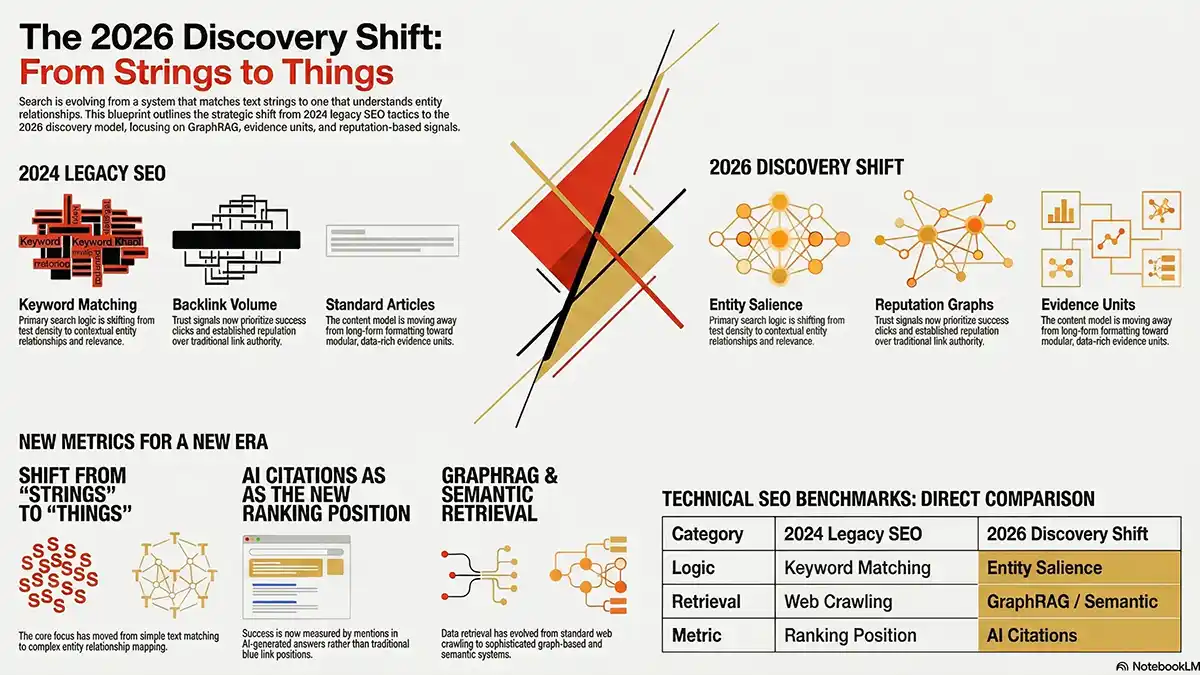
The 2026 Discovery Shift: Strategic Evolution to Using Interactive Content
Written by Jeannie M. Hill
Real-time interactive content directly impacts conversion rates.
This article is for anyone asking, “How do I stay visible when search results are evolving into AI-driven snapshots?”
We are moving to a world where entity salience and reputation graphs dictate who gets cited in AI-generated snapshots. To help AI SEO strategists and my clients visualize this transition, I have developed an interactive Discovery Shift Dashboard.
I used Google AI Studio to rapidly prototype and deploy the interactive SEO comparison card below.
How to Build Engaging User Experiences Efficiently?
As Google Search evolves through AI Overviews and multimodal discovery, the roadmap for visibility is changing.
To capture attention and drive conversions in 2026 and beyond, I like to use dynamic, real-time, and interactive content.
Try It Yourself: Click the button below to toggle between the 2024 Legacy SEO model and the 2026 Entity-Driven Shift. Notice how interacting with the data makes the conceptual shift instantly easier to digest.
This tool, prototyped in Google AI Studio, demonstrates the strategic evolution required to move beyond legacy SEO into the era of semantic retrieval. Below, you can explore the comparative data and interact with the live dashboard to assess your industry’s “Strategic Readiness” for 2026. How did I do this?
To create my comparative analysis, below is the table that I created and fed via a prompt to AI Studio.
| Category | 2024 Legacy SEO | 2026 Discovery Shift |
|---|---|---|
| Primary Logic | Keyword Matching & Density | Entity Salience & Context |
| Trust Signal | Backlink Volume/Authority | Reputation Graphs & Success Clicks |
| Data Retrieval | Standard Web Crawling | GraphRAG & Semantic Retrieval |
| Content Model | Article Formatting | Evidence Units |
| Success Metric | Ranking Position (Blue Links) | AI Citations & Mentions |
| Core Focus | “Strings” (Text matching) | “Things” (Entity relationships) |
Below is the Interactive Content After Using AI Studio
The following makes the app feel like a “working interface” to the user:
- A “Quick Start” Legend: A clear guide on the left side explaining exactly what the user is looking at.
- Interactive Hover States: When you move your mouse over a section, it glows and scales up, making it feel responsive and alive.
- Smooth entry animations: They capture user attention through motion, providing visual feedback that makes navigation intuitive, and reducing cognitive load to make content easier to understand.
- Bold editorial typography: Aids interactive content by instantly grabbing attention, establishing a clear visual hierarchy, and improving scannability, which encourages user engagement and reduces bounce rates.
- Strategic Scorecard: A visual progress bar that explains the “Strategic Readiness” of the industry.
Final process to add this interactive card to my web page:
- AI Studio: Click “Republish App” and wait for it to finish.
- AI Studio: Click the “Share” button (top right).
- The Public Link: Click the “Copy link” button. This link will look like aistudio.google.com/app/shared/app/….
- WordPress: Paste that link into the src part of your iframe code.
NOTE: The key differences between Google AI Studio and Vertex AI center around the time it takes, their intended use cases, complexity, budget, and deployment methods.
For me, this was an “experiment” in using Google AI to offer interactive elements within web pages.
Avoid the iframe by using React
It is possible to embed a React-based interactive dashboard directly into your WordPress theme. It involves building the React application, uploading its compiled files, and then “enqueueing” those files within your theme’s functions.php file.
An Interactive App Built with AI Studio, React, & Tailwind
The challenge here was how React, Tailwind, iframes, and WordPress sorta “fought” with each other for control of the layout. My goal was to get my interactive dashboard to display how I designed it.
In the Flash days, I built similar-looking interactive .swf files, set the canvas size, dropped it on a webpage, and it looked the same on every single monitor. Unless someone turned off JavaScript.
It didn’t matter which WordPress theme was used. It didn’t try to guess if it was on a phone or a desktop. It didn’t care about “CSS breakpoints.” It was a sealed, perfect little box that just worked. Until it didn’t!
Within the Google AI Studio environment, I use the “Artifacts” or “Code Execution” style workflow.
“3D Flip Master” AI Studio Interacive Card
Initially, I created and published this same table in a 3D Flip Master Interactive Card. However, the model changed that I used. Hence, I worded to recreate it.
Instead of a standard side-by-side table, my initial resulst uses a Split-View Switcher or a Hover-Reveal Card. This helped the user to visually follow my intent to show how search engine result pages have “shifted” from 2024 to 2026, mirroring the industry transition.
Since research signals that LLMs favor content based on direct user engagement, I thought this was worth a try. In the future, I’ll continue testing new ways to offer contextualized, tailored interactive experiences for my target audience.
Feel free to check as I update this article.
Why Interactive Content Skyrockets Conversions
Interactive content transforms passive readers into active participants. Here is why this shift is crucial for your bottom line:
- Increased Dwell Time: When users click, toggle, and explore, they stay on the page longer. This sends a strong positive user experience (UX) signal to search engines.
- Higher Information Retention: Complex topics—like moving from “Backlink Volume” to “Reputation Graphs”—are easier to understand visually than through dense paragraphs.
- Frictionless Micro-Conversions: Every interaction is a micro-conversion. By getting users to engage with a tool or card, you build trust, making them much more likely to complete a macro-conversion (like filling out a contact form).
What are Additional Ways to use Google AI Studio for Interactive Content?

My interest is in educational, explanatory, and marketing examples:
- Advanced Comparative Data Displays: Instead of using standard side-by-side tables, like above, use AI Studio to build “Split-View Switchers” or “Hover-Reveal Cards” for comparative analysis. (I LOVE this one!)
- Interactive Educational Visualizations: Paige Bailey shared this on Twitter, and it’s a fun go. You can transform static textbook diagrams or drawings into engaging, animated learning tools.
- Contextual “AI Tutors”: It’s on my to-do list to add a chat panel directly into interactive content. This should function as a contextual guide to users who ask specific questions about what they are seeing.
- User-Driven Simulations and Controls: You can build apps that empower additional user manipulation, moving beyond simple clicks. This includes features like draggable start/end nodes, wall drawing via click-and-drag, and timeline playback controls (play/pause/step) with adjustable animation speeds.
- Multimodal Interactive Workflows: This one I haven’t tried yet, but plan to. Search is definitely becoming more multimodal. I intend to design a workflow where a person can draw a concept on paper (like a page layout diagram), upload it, and watch the AI instantly animate it step-by-step while explaining its decisions.
Several individuals have asked me about my workflow, so I’ll cover my experience a bit.
Behind the Scenes: The Technical Details
Is there a better way to accomplish this using Vertex AI or Antigravity?
I can sum the answer up by saying, not now (without a cost). At least, I didn’t find it so.
Vertex AI is Google’s enterprise heavyweight for training massive machine learning models and managing data pipelines. Asking Vertex AI to build a flippable web card would be like using a nuclear reactor to toast a bagel.
Vertex AI for data scientists, not web design.
AI Studio was my tool for prototyping this at the moment. I will be adding how my next interactive web project using Antigravity goes. Hopefully, I can get it to play nice with responsive 3D elements.
Why Vertex AI is NOT the Better Option
Simply, it is not a Web Builder. Each AI tool has its own use cases. AI Studio provides a handy preview window where it writes the code, and I can view the actual visual app. Vertex AI does not have that. It is a backend platform for data scientists and developers.
Vertex AI’s enterprise complexity
- It involves setting up a Google Cloud Project.
- You enable a billing account, configure IAM (Identity and Access Management), and security roles.
- Then I’ve used Python or Node.js code for the AI to talk to me.
- You then need to provision your own server and manually deploy it.
- It will not spin up a .run.app link for you.
However, I much prefer Vertex AI for other tasks. More on that in another post.
The “Live API” Way (Potential Cost)
A “live” interactive content card that is “talking” to Gemini in real-time (e.g., a user types a keyword and the card generates a “2026 Strategy” on the fly), uses an API Key.
- Free Tier: Google’s’free tier for Gemini API keys is generous.
- Paid Tier (Pay-as-you-go): If a page on your site gets significant traffic, you would eventually move to a paid tier where you pay per “1,000 characters” processed.
Note: The “Discovery Shift” card demonstrated above avoids pay-as-you-go. Although back in February, I had a “flip card” version which required the API Key.
To be honest, AI Studio is rapidly updating. I’m sure to update this page. As I updated this “2026 Discovery Shift” dashboard, things were already changing.
What’s New in AI Studio v4.0:
- Editorial Design: A bold, magazine-style layout with high-impact typography (Anton and Inter).
- Strategic Context: Added a “Core Thesis” section and a “Strategic Readiness” scorecard to give the data more depth.
- Motion & Atmosphere: Smooth entry animations and subtle background gradients for a professional “premium” feel.
- Refined Footer: A detailed methodology and about section to establish authority.
Recapping Highlights: Why It’s Important to Add Interactive Content
The transition from keyword-matching to entity-driven discovery isn’t just a trend—it’s a fundamental architectural shift in how Google and other AI-led search engines understand value.
As we move along in 2026, static content is no longer enough.
By integrating interactive ‘Evidence Units’ and real-time visualization tools built with platforms like Google AI Studio, we don’t just tell users (and AI) that we are experts; we prove it through engagement. Staying ahead means moving beyond the ‘blue link’ and into a world of responsive, context-aware discovery.
Interactive content can feed your Google Knowledge Graph, primarily by acting as a source of structured data and high-quality information. It helps Google understand entities, their relationships, and user intent. Interactive content, when properly structured, enables Google to go beyond verifying facts to gathering in-depth, user-focused information.
Increase your Visibility in AI search with Interactive Content
If you want to outrank competitors and win success clicks in an entity-driven landscape, integrating interactive elements is a powerful way to start.
Formerly, this article had just a table; now it’s a strategic visualization tool for 2026. (Hill Web Marketing also provides multiple other types of interactive content.)
As we refine strategies for generative AI search, continuous testing is key. Our experience shows that starting with high-performing content is one of the most effective ways to adapt to this evolving landscape.
Call me at 651-206-2410 to gain interactive content for your website.
Enlist help to Create Content Ideal for AI Overivews